The CIRKULYX In-Wall Cable Management Kit is the best overall choice for a gaming-focused TV console setup, with the Under-Desk Cable Management Tray as the runner-up for anyone who wants a no-drill fix in an afternoon.
Here is the styling problem nobody warns you about: you invest in a beautiful low-profile media console, mount the TV at the perfect height, and then a tangle of HDMI cables, three power bricks and a controller charger undoes the entire look. Gaming setups are cable-dense by nature — consoles, soundbars, routers, capture cards — and most TV stands were designed for a single cable box in 2009. This guide covers the kits and shelving systems I actually recommend for making a console wall look intentional, from in-wall pass-throughs that erase cords completely to floating glass shelves that let your hardware breathe.
Our top picks



As an Amazon Associate we earn from qualifying purchases at no extra cost to you.
Quick Comparison
| Product | Best For | Standout Feature | Rating |
|---|---|---|---|
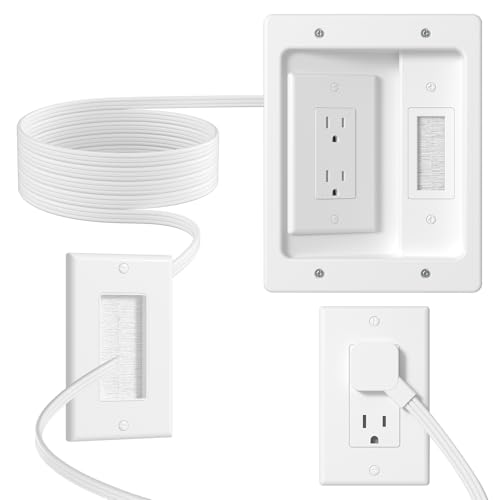
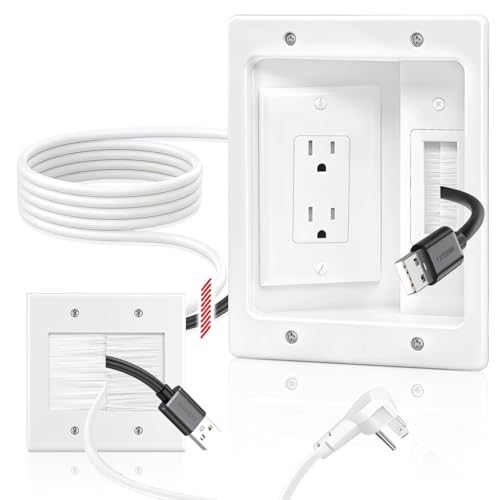
| CIRKULYX In-Wall Cable Management Kit | Full cord concealment behind a wall-mounted TV | Recessed 2-AC outlet box with 9.8ft cord | See card above |
| Under-Desk Cable Management Tray, 15-Cord | Renters and no-drill setups | Holds up to 15 cords with 20 pairs of clips | See card above |
| Suptek Glass Floating Shelves, 2-Tier | Design-forward console display | Tempered glass on a TV wall-mount bracket | See card above |
| Naerza In-Wall Cable Management Kit | Multi-console power routing | Two-hole socket that fits all plug shapes | See card above |
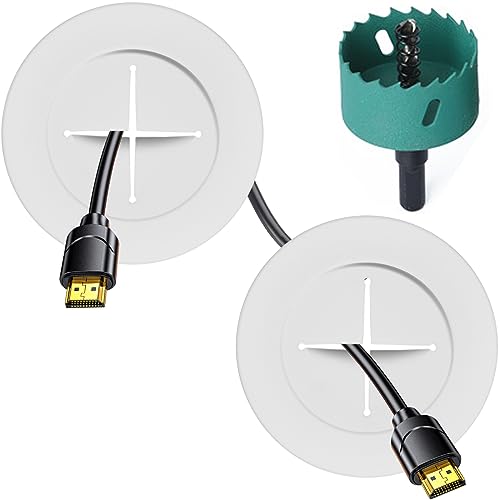
| TV Wire Hider Kit for Wall-Mount TV, White | First-time DIY installs | Includes hole saw drill attachment | See card above |
How to Choose a TV Console with Cable Management for Gaming Setups
- Count your devices first: Tally every powered item — console, TV, soundbar, router, charger — then choose a system rated for at least two more cords than you own. Gaming setups always grow.
- Match the finish to your wall, not your TV: Pass-through plates and raceways disappear when they share the wall color. A white kit on a warm-white wall reads invisible; black hardware on the same wall reads as a mistake.
- Respect airflow: Consoles throttle in sealed cabinets. Open shelving or a console with a vented back panel beats a closed door every time.
- Check reach before you buy: Measure from your outlet to the TV mount and add 24 inches of slack for tilting brackets. A 9ft cord sounds generous until the outlet sits behind the sofa.
- Decide drill or no-drill early: In-wall kits deliver the cleanest result but need drywall access. Adhesive trays and clip-on organizers protect your deposit and still cut visual clutter dramatically.
The Best TV Consoles with Cable Management for Gaming Setups Reviewed
Best Overall: CIRKULYX In-Wall Cable Management Kit
This is the kit for anyone who wants a truly floating TV above a low console, with a recessed dual-AC box that hides power and signal cables inside the wall. Best for homeowners with drywall access who are styling a feature wall and refuse to see a single cord.
Best Budget: Under-Desk Cable Management Tray, 15-Cord Organizer
Mounted under a console top or behind a media unit, this tray lifts power strips and adapters off the floor so the whole piece reads lighter. Ideal for renters, apartment gamers, and anyone who wants a same-day improvement without touching a stud finder.
Best Premium: Suptek Glass Floating Shelves, 2-Tier
Tempered glass shelves on a wall bracket give a PS5 or Xbox the gallery treatment while keeping cords running vertically behind the TV. Best for small living rooms where a full console would crowd the floor and you want the setup to look deliberate.
Best for Multi-Console Power: Naerza In-Wall Cable Management Kit
The two-hole socket accepts bulky console power bricks that standard recessed boxes reject, which matters when you are running two systems plus a soundbar. Choose this if your hardware collection rotates and you need plug flexibility.
Best for First-Time DIY: TV Wire Hider Kit for Wall-Mount TV, White
Including a hole saw drill attachment removes the guesswork that stops most people from attempting an in-wall run. Perfect for the confident beginner styling a bright, minimal room where white hardware vanishes into the wall.
Frequently Asked Questions
Do in-wall cable kits meet electrical code?
Kits with recessed outlet boxes and rated cords are designed for compliant installs, but you cannot run a standard extension cord inside a wall. Always use the supplied cord and check local requirements.
Will a closed TV console overheat my console?
It can. Consoles need clearance and airflow, so remove a back panel, drill a vent, or move the unit to open shelving if you notice fan noise increasing.
What is the cleanest option for renters?
Adhesive or clamp-on trays paired with a cord cover painted to match the wall. You get most of the visual benefit with zero patching at move-out.
How many shelves do I actually need?
Two tiers handle a console and a soundbar; step up to a three-shelf bracket like the Suptek CS303 if you also run a router, capture card, or second system.
Final Thoughts
For a genuinely cord-free gaming wall, start with the CIRKULYX In-Wall Cable Management Kit and add the Suptek Glass Floating Shelves to display hardware without crowding the floor. If drilling is off the table, the Under-Desk Cable Management Tray delivers the biggest tidy-up per dollar.